
OpenSign v2.1.0 introduces new features including support for Multi-User functionality & Public Profiles
We’re excited to announce the release of OpenSign v2.1.0! This latest version comes with a range of improvements designed to make the platform more user-friendly and secure than ever before.
1. Multi-User Functionality
In OpenSign v2.1.0, one of the most-awaited features has finally arrived: multi-user capability. This game-changing feature is set to revolutionize the way organizations handle their document workflows and team collaborations.
Seamless Team Management
With the new feature in OpenSign v2.1.0, organizations can now create teams and set up individual user profiles within those teams. Each team member can have their own account with personalized login credentials. Once set up, users can independently manage their contacts, files, and templates. This level of individualized control ensures that every team member has the tools needed for greater efficiency and organization.
Streamlined Collaboration with Shared Templates
A standout feature of OpenSign v2.1.0’s multi-user functionality is the ability for users to access templates shared by users with editor role. This feature is designed to streamline collaboration and workflow for the entire team. Editors can create and distribute templates for all team members to use, fostering consistency and efficiency while saving time. Not only does this enhance teamwork, but it also significantly improves the effectiveness of your document processes.
Enhanced Control for administrators.
Administrators play a crucial role in managing team operations and OpenSign v2.1.0 makes their tasks much easier. With the enhanced user management feature, organization admins gain better oversight of their teams. They can assign roles and permissions to users, ensuring that each team member has the appropriate access and capabilities to perform their designated tasks.
2. Public Profile Functionality
You can now create documents for signatures on-demand through self-service with OpenSign public profiles. Reduce document preparation time and seamlessly integrate collected data into your current applications. The Public Profile feature offers the security and user-friendliness you and your clients expect from OpenSign, along with its versatility.

Benefits:
Increased Visibility: Users can now share their templates with a wider audience, enhancing their online presence and showcasing their credentials.
Enhanced Personal Branding:
The ability to create a public profile offers users a platform to present their skills, achievements and contact information in a professional manner, all this while seamlessly managing the signing of agreements and contracts with their audience.
OpenSign public profiles are ideal for:
Activity waiver forms | Event sign-ins and registrations | Sales order forms |
Customer-initiated account change request forms | New customer sign-ups | Standard NDAs |
Release forms | Visitor lobby registrations | and much more... |
3. Reason for Decline/Revoke Document
This latest feature requires users to state a reason before they decline a document which brings an extra, important level of transparency and accountability to the whole document management system.
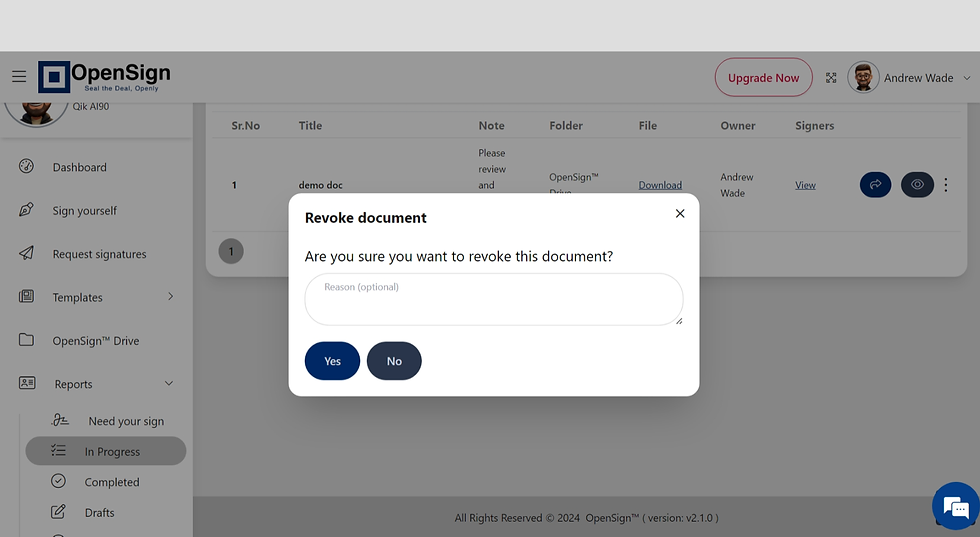
Benefits:
Enhanced Accountability: By allowing users to provide a rationale for declining documents, this functionality guarantees that all choices are properly recorded and explained.
Better Record-Keeping: Providing reasons for declined documents aids in maintaining thorough records, which can be valuable during inspections and audits.
4. Clickable Profile Section
The latest update now includes a clickable profile section on the sidebar, making it more convenient for users to access their profile information.

Benefits
Convenient Navigation: Users can now easily move to their profile and settings from the sidebar, which saves time and enhances the user experience.
Streamlined User Experience: This improvement streamlines the way users access and handle profile information leading to an interface.
OpenSign Version 2.1.0 comes with additions to enhance user experience, teamwork and system operations. Whether you're collaborating with a team or managing your hosted instance these enhancements are designed to simplify and boost your document management and signing processes for efficiency and effectiveness.


https://kkwinzz.com/ vô tình lọt vào mắt mình lúc đang xem một video về các công cụ hỗ trợ học tập rồi đọc phần thông tin bên dưới. Mình chủ yếu quan sát bố cục địa phương và cách các phần thông tin được đặt trên trang. Tổng thể khá thoáng nên việc xác định từng khu vực không bị mất nhiều thời gian, thao tác chuyển mục cũng phản hồi nhanh. Mình chưa sử dụng lâu nên muốn hỏi thêm các bác đã theo dõi thường xuyên trải nghiệm thực tế thế nào.
c168 này mình tình cờ lướt qua khi đang tra cứu một số tài liệu trực tuyến. Mình chủ yếu để ý đến thiết kế, hệ thống danh mục cùng cách bài trí thông tin trên website. Nhìn chung giao diện khá gọn gàng, các phần được tách bạch rõ ràng giúp việc quan sát rất thuận tiện. Lướt qua một lượt xong mình lại quay về với nội dung đang tìm kiếm dở dang.
Hôm kia đang lướt web fly88com thì vô tình thấy tên trang nên ghé vào xem thử. Mình chỉ quan sát nhanh phần thiết kế, menu và cách chia nội dung chứ chưa đọc sâu. Cách làm khá “LEAN”, trang không nhồi quá nhiều thông tin, mỗi khu vực có vị trí riêng nên nhìn khá dễ nắm. Phần giấy phép pháp lý được đặt tương đối công khai, ai muốn xem thông tin thì không cần tìm quá lâu. Lướt qua vài mục thấy bố cục khá cân đối, tiêu đề dễ nhận ra và tổng thể tạo cảm giác sạch, gọn hơn là rối mắt.
Lúc đang tìm kiếm tài liệu cho chủ đề mình quan tâm, mình tình cờ bắt gặp 99OK. Mình thử mở và dành thời gian xem qua một vài khu vực. Nhìn chung, nội dung được phân chia khá hợp lý, các phần cần tìm đều có vị trí tương đối rõ ràng. Nhờ cách sắp xếp này, quá trình chuyển từ trang này sang trang khác diễn ra khá thuận tiện. Sau khi tham khảo xong, mình tiếp tục với nội dung mà mình đang tìm kiếm.
game cá độ luckywin là cái tên mình tình cờ bắt gặp khi đang xem một số nội dung trên mạng nên có ghé qua website để xem thử. Mình chủ yếu quan sát cách trang sắp xếp các khu vực, menu và thông tin trên giao diện. Nhìn tổng thể, các nội dung được chia thành từng nhóm riêng nên khi lướt qua có thể dễ dàng nhận biết cấu trúc của trang. Một số khu vực được đặt khá nổi bật, trong khi những phần thông tin khác được bố trí ở các vị trí riêng. Mình mới chỉ xem qua website trong thời gian ngắn nên chưa tìm hiểu kỹ từng chức năng hay nội dung cụ thể.…